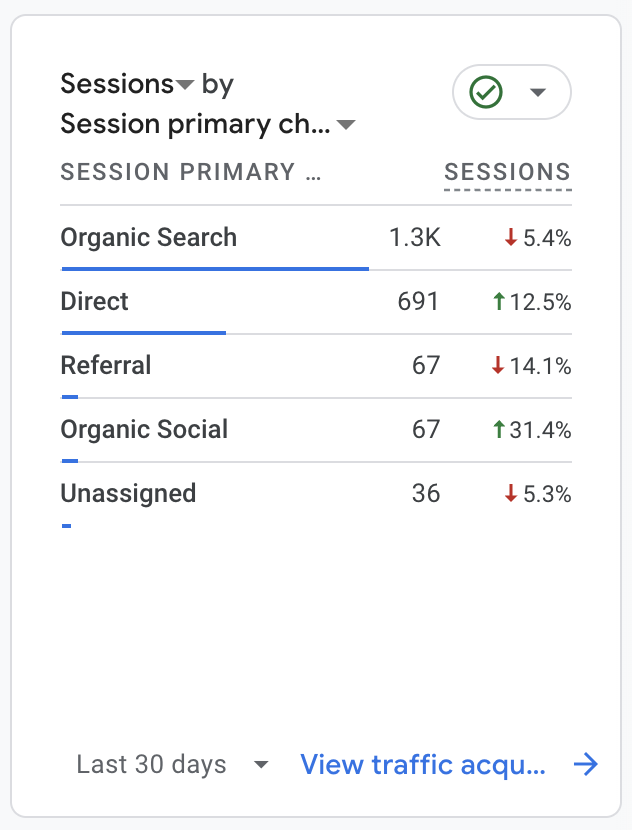
Have you ever looked at your Google Analytics dashboard, seen a spike in “direct traffic,” and thought, “Heck yeah! People are typing in my URL to come directly to my website!”?
Well, maybe. But more likely? That “direct” traffic came from somewhere else entirely, like Pinterest.
Google misattributing traffic from Pinterest as “direct” can be one reason your Pinterest marketing doesn’t seem to be getting you the results you thought it would. (Here are some others →)
It’s one of the first things I tell any of my clients when we start really digging into the data. But to be honest, I don’t totally understand why it happens or how to account for it.
That’s why I tagged in Rebecca of Three Groves Marketing to explain what’s going on and how you can use UTM links to track your Pinterest traffic more accurately!
I’ll let her take it from here:
Hi, I’m Rebecca, and as a Marketing Measurement Specialist, I help business owners figure out what’s actually working in their marketing (and what’s not) so they can make smart, data-informed decisions without overwhelm.
And one of the most common data gaps I see? Traffic from platforms like Pinterest showing up in Google Analytics as “direct.”
It’s easy to assume that “direct” = interested, loyal visitors.
But often, that’s not the case!
Google Analytics files sessions under “direct” when it doesn’t understand where they came from, meaning no referral information was passed along.
And Pinterest is one of the biggest culprits.
What Counts as “Direct” Traffic (And Why That’s a Problem)
Google Analytics groups traffic as “direct” when the source is missing or blocked.
That can happen when someone:
- Types your URL into their browser
- Clicks a link from a PDF or offline doc
- Opens an email and clicks a raw URL
- Visits your site from inside an app, like Pinterest’s in-app browser
Why is this a problem?
Because without data you can’t make good decisions.
When all of your in-app browser sessions show up as “direct” you are missing clues about which platforms are worth your time! Making it way harder to double down on what’s driving leads and sales in your business.
Why Pinterest Traffic Often Shows Up as “Direct”
Pinterest is such an excellent, fairly low lift way to fill the top of your funnel but sometimes it has a sneaky flaw – tracking.
You create a ton of pins and then check your analytics to find way less traffic labeled as “Pinterest” than the effort that you put in. 🫠
Instead, it’s showing up as “direct.” Why?
You aren’t the only one! It’s an ongoing issue, in fact I found reddit threads dating back 5 years.
The In-App Browser Problem
When you are scrolling along – whether on Pinterest, Instagram, Facebook, or tons of other apps – and you open a website, generally you are browsing on an an in-app browser (unless you tap to “Open in External Browser”)
This means that the referral information isn’t always passed along to Google Analytics, and without that tracking Google Analytics pops that traffic into the “direct” bucket.
I mentioned previously this has been an issue for years, but more recently in June of 2025 creators started noticing a sharp drop in organic Pinterest traffic…
Or were they?
Maybe? But what’s most likely happening is that the traffic is now being registered as “Direct” traffic.
So how can you get a handle on your data?
Enter: UTM Links (Your Secret Weapon)
It’s not possible to capture 100% of your traffic sources, but there is a way that we can get much clearer about where our traffic is truly coming from!
And that’s with UTM Links!
What Are UTM Links?
UTM links are special codes that help people who run websites keep track of where their visitors are coming from.
They began as a technology developed by a company called Urchin Software Corporation, and were originally called Urchin Tracking Module. The UTM technology was acquired by Google and the term UTM is now widely used to refer to any system or method for tracking the source of website traffic.
UTM parameters are small tags you add to the end of a URL.
Think of them like file folders. UTM parameters are attached to each link and they tell Google Analytics exactly where a click came from.
Each parameter tells you something new.
For example you might use
- Source to track the source (think platform – IG, Facebook, Email service provider)
- Medium to track the a medium (think type of traffic – social, email, paid, referral)
- Campaign to track your marketing campaign (think – what are you launching or promoting)
- Term to track keywords (I like to use this for placement. Think – stories, call to action description, any other identify you need)
- Content to track visuals or another distinguishable element.
How UTM links Fix the Direct Traffic Tracking Problem
Google Analytics categorizes traffic as “direct” when:
- No referral information is passed
- There are no UTM parameters to provide context
Adding UTM parameters ensures that you don’t leave it up to chance, or to Pinterest’s occasionally unreliable in app browser.
How to Set Up UTM Links for Pinterest
You can build your UTM links manually using Google’s Campaign URL Builder, or automate it with a tool like my UTM Tracking Spreadsheet.
[Sarah again here: Rebecca set up this spreadsheet for me and it is a LIFESAVER!]
The rad thing about UTM parameters is that you have some freedom to use the naming conventions in a way that makes sense for you.
UTM parameters will not be recognized by Google Analytics unless you use Source, Medium, and Campaign, so make sure you are using each of them as you build your links.
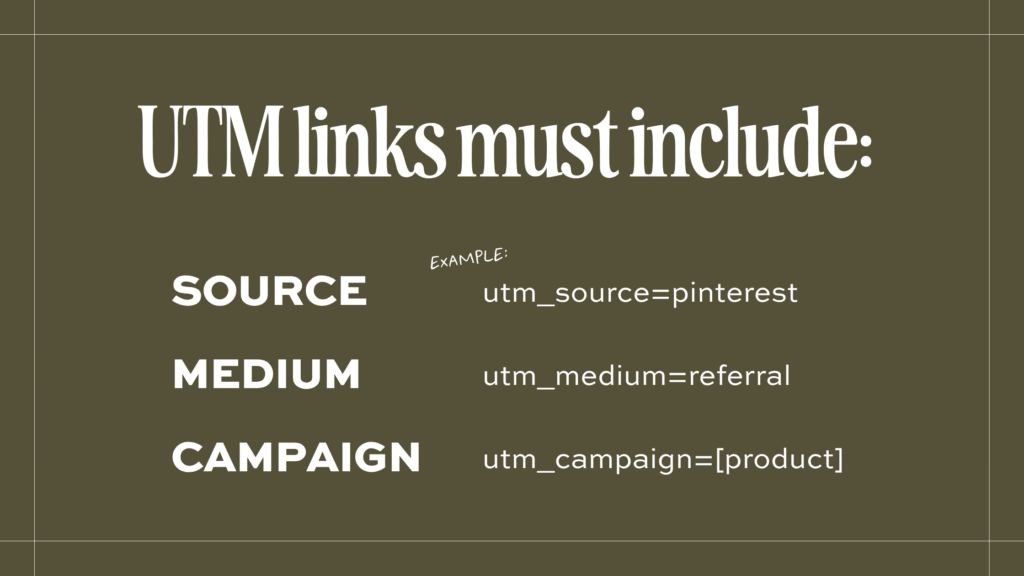
Here are two ways you could go about setting up UTM links for your Pinterest pins:
#1 Simple and Easy
- utm_source=pinterest
- utm_medium=referral
- utm_campaign=[product or free offer]
Your UTM tagged link will look like this:
https://www.yourwebsite.com/?utm_source=pinterest&utm_medium=referral&utm_campaign=freebie
#2 With More Nuance
- utm_source=pinterest
- utm_medium=referral
- utm_campaign=[product or free offer]
- utm_term=[pinterest board]
- utm_content=[pin image descriptor]
You UTM tagged link will look like this:
https://www.yourwebsite.com/?utm_source=pinterest&utm_medium=referral&utm_campaign=freebie&utm_term=board-name&utm_content=pin-description
Which one you choose is totally up to you! How granular do you want to track your content?
If you just want to know your traffic is coming from Pinterest – use option #1
If you want to really see which boards and pin images are producing results – use option #2
Caveat: you must include a source, medium, and campaign or your UTM parameters will not be recorded!
My Best Advice for Using UTM Links on Pinterest
My best advice for using UTM links on Pinterest is to be consistent!
Develop a simple naming system that makes sense to you and stick to it.
Beyond UTM Links: What Else You Can Track
You can use UTM links to track multiple elements of your marketing campaigns all across the board.
Things like:
- How much traffic is coming from social media? (Instagram, Threads, Facebook, Tik Tok, etc.)
- Do SEO based marketing strategies work the best for you? (SEO, blogging, Pinterest)
- Is the effort you are expending producing the results you’d expect?
Which means you can start answering questions like:
- Which platform actually drives the most traffic?
- Which pin leads to the most email signups or sales?
- Should I keep investing in Pinterest or focus elsewhere?
If you’ve been using Pinterest to drive traffic and wondering why it’s not showing up in your analytics… now you know.
You just might be missing some key tracking steps.
Adding UTM links won’t capture allll of your data, but it’s one of the simplest ways to get clearer data about what’s actually moving the needle in your marketing.
And if you wanna learn more about how you can use UTM links for your entire marketing strategy check out “What Are UTM Links and Why Do You Need Them?”
Stay Connected with Rebecca at Three Groves
If you’re tired of guessing what’s working in your marketing I gotcha! Here are a few ways I can help:
My free 5-Day Marketing Measurement Makeover gives you one tiny task a day so you can finally see what’s driving your business forward and what you can confidently put down. Sign up here and five days from now, you’ll know exactly where to spend your precious time, energy, and money.
Analytics Action Plan – In this 90-minute session, we’ll audit your current tracking, identify what metrics matter most for your business, and create a clear plan to move forward.
Custom Marketing Analytics Dashboard – I’ll build you a dashboard that shows exactly what’s producing results in your business (and what’s not) at a glance.
Just getting started with marketing data? Let’s be friends on the ‘gram! I share useful tips and behind-the-scenes peeks at how data can support intentional, values-aligned marketing.